Centralizing MCP Authorization with PingAuthorize - Part 1
How to centralize dynamic authorization for MCP servers exposed by Azure APIM with PingAuthorize.
Context
Large organizations often adopt multiple cloud platforms, modern AI services, and distributed applications, which leads to increasingly fragmented authorization. A single enterprise for example may expose MCPs through Azure, AWS, and on-premises servers.
Each platform introduces its own authorization mechanism, and over time, business rules become scattered across gateways, serverless functions, middleware, and application code. The result is duplicated policies, inconsistent decisions, difficult audits, and expensive maintenance.
PingAuthorize addresses this problem by separating policy enforcement from policy decision making. Gateways and applications remain responsible for enforcing decisions as Policy Enforcement Points (PEPs), while PingAuthorize acts as the centralized no-code Policy Decision Point (PDP).
This is the first article in a series exploring how PingAuthorize can centralize authorization decisions across different platforms and MCP environments.
I start with Azure API Management (APIM) protecting an MCP server, while future articles will apply the same model to other enforcement points such as AWS AgentCore Gateway.
What Problem PingAuthorize solves: Sprawl Across Hybrid Environments
As enterprises expand across cloud providers and AI platforms, these challenges emerge.
- Inconsistent authorization — Business policies become embedded in platform-specific implementations. The same rule may be implemented differently across gateways, clouds, and applications, producing inconsistent decisions.
- Policy duplication — Authorization logic is copied into multiple enforcement points. Every policy change must then be implemented several times, increasing the risk of drift.
- Authorization logic in code — Without a dedicated policy engine, teams implement authorization rules directly in application code or middleware. This consumes development cycles and ties every policy change to code reviews, testing, and deployments.
- Limited governance — Authorization decisions are distributed across platform-specific logs, making it harder to understand why access was granted or denied and increasing the effort required for auditing and compliance.
PingAuthorize solves those challenges by centralizing policy evaluation: it evaluates the business policy and returns the authorization decision. This allows organizations to:
- keep business authorization rules outside applications and MCP servers
- update policies without redeploying APIs
- use contextual and attribute-based authorization
- centralize authorization decisions and audit information
- reuse the same authorization model across different platforms
- gain visibility and improve auditability by logging every authorization decision
The solution
The first implementation in this series implements an APIM Policy Fragment that delegates the authorization decisions to PingAuthorize. The fragment forwards the original MCP request to the PingAuthorize Sideband API, and then either forwards the call to the MCP server or relays the authorization denial to the caller.
The following diagram depicts the components in the implementation and their interactions.
%%{init: {'flowchart': {'curve': 'linear'}}}%%
flowchart LR
    C["Agent"]
    MCP["Protected MCP"]

    subgraph AZURE["Azure APIM"]
        APIM["Azure API Management\nMCP endpoint"]
        FRAG["APIM Policy Fragment\nSideband PEP"]
    end

    subgraph PING["PingAuthorize"]
        SB["Sideband API\n/sideband/request"]
    end

    C -->|"MCP tools/call\n(Agent Access Token - delegated)"| APIM
    APIM --> FRAG
    FRAG -->|"Sideband request\n(method, URL, headers, body)"| SB
    SB -->|"200 without response object\nPERMIT"| FRAG
    SB -->|"200 with response object\nDENY (status + WWW-Authenticate)"| FRAG
    FRAG --> APIM
    APIM -->|"tools/call if PERMIT\n(JSON/RPC payload)"| MCP
- Agent — invokes MCP tools through APIM using an Agent Access Token (typically obtained via Token Exchange).
- Azure API Management — acts as the Policy Enforcement Point (PEP). Receives the MCP request, runs the policy fragment, and either forwards the call to the backend MCP or relays the denial.
- APIM Policy Fragment — a reusable APIM policy artifact that preserves the original request, wraps it in a Sideband request envelope, calls the PingAuthorize Sideband API with a shared secret, and enforces the returned decision. It performs no OAuth flows of its own.
- PingAuthorize Sideband API — acts as the Policy Decision Point (PDP). Receives the original request, evaluates policy over the full HTTP context, and either allows the call through (no response object) or returns a complete denial response for the PEP to relay.
- Protected MCP — the protected MCP server (in our context a demo Mortgage MCP), receives requests only after APIM allows them through.
The important aspect is that APIM does not contain the business authorization logic. It forwards the request context required for policy evaluation and enforces the resulting authorization decision.
Scope note: This article focuses on the authorization integration between APIM and PingAuthorize. Token validation, token exchange, and backend MCP server security are outside the scope of this article. In a production setup, APIM could exchange the inbound token for a backend-scoped token before calling the MCP server. For simplicity, the demo MCP server is left open and no token exchanges have been configured in APIM.
The Sideband Integration Model
With this model, APIM constructs a Sideband representation of the incoming request containing the HTTP context required by PingAuthorize. PingAuthorize evaluates policy against the full HTTP context: request method, URL, headers (including the Authorization bearer token and its claims), query parameters, client IP, and the request body.
The integration follows three rules:
- Permit — the PDP returns HTTP 200 with no top-level
responseobject. The PEP continues to the backend. - Deny — the PDP returns HTTP 200 with a top-level
responseobject containing a complete response to hand back to the client: status code, reason, headers (includingWWW-Authenticate), and body. The status in that object is the PDP’s choice, not the PEP’s:401with aWWW-Authenticateheader when the token is invalid or a step-up is required,403when the request is authenticated but not authorized. The PEP relays it verbatim. - Fail closed — any transport failure or non-200 result is an integration error, not an authorization decision. The PEP does not continue and returns
502 Bad Gateway(sideband-unavailablefor a failed call,sideband-errorfor a non-200 reply) — an unreachable PDP never becomes implicit access.
For an MCP call such as:
1
2
3
4
5
6
7
8
9
10
11
{
    "jsonrpc": "2.0",
    "id": 2,
    "method": "tools/call",
    "params": {
        "name": "get_mortgage_summary",
        "arguments": {
            "customerId": "CUST-10001"
        }
    }
}
the fragment sends to the PingAuthorize sideband endpoint the following request:
1
2
3
4
5
6
7
8
9
10
11
12
13
14
{
  "source_ip": "203.0.113.10",
  "source_port": 5034,
  "method": "POST",
  "url": "https://apimid4ai.azure-api.net/mortgage-mcp/mcp/mortgage",
  "http_version": "1.1",
  "headers": [
    { "Accept": "application/json" },
    { "Content-Type": "application/json" },
    { "Host": "apimid4ai.azure-api.net" },
    { "Authorization": "Bearer <agent-access-token>" }
  ],
  "body": "{\"jsonrpc\":\"2.0\",\"id\":2,\"method\":\"tools/call\",\"params\":{\"name\":\"get_mortgage_summary\",\"arguments\":{\"customerId\":\"CUST-10001\"}}}"
}
A PERMIT returns HTTP 200 with no response object; a DENY returns HTTP 200 with one:
1
2
3
4
5
6
7
8
9
10
{
  "response": {
    "response_code": 403,
    "response_status": "Forbidden",
    "headers": [
      { "Content-Type": "application/json" }
    ],
    "body": "{\"jsonrpc\":\"2.0\",\"id\":2,\"error\":{\"code\":-32003,\"message\":\"Forbidden\"}}"
  }
}
The APIM Policy Fragment
The integration with PingAuthorize is implemented directly as an APIM policy fragment. The fragment performs four operations:
- Preserve the MCP request.
- Build the Sideband request envelope.
- Call the PingAuthorize Sideband API.
- Enforce the returned decision.
The fragment is driven by three APIM Named Values:
| Named Value | Type | Purpose |
|---|---|---|
AuthorizeSidebandRequestEndpoint | Plain | Base URL of the Sideband API without /sideband/request. Example for PingAuthorize software: https://paz.example.com:7443. Example for PingOne Authorize (cloud): the gateway Service URL, such as https://http-access-api.pingone.eu/v1/environments/{environmentId}. |
AuthorizeSidebandClientToken | Secret | The sideband shared secret — the Sideband API shared secret configured on PingAuthorize, or the gateway credential on PingOne Authorize. |
AuthorizeSidebandDebug | Plain | false by default. Set to true temporarily to return a redacted Sideband request and the complete authorization response to the API client for diagnostics. |
1. Preserve the MCP Request
The Sideband API requires the original body as a string, so the fragment reads it before anything else and preserves it for later forwarding:
1
2
3
4
5
<set-variable
name="authorizeOriginalRequestBody"
value="@(context.Request.Body == null
? string.Empty
: context.Request.Body.As<string>(preserveContent: true))" />
2. Build the Sideband Request Envelope
The envelope mirrors the original request. APIM rebuilds the full request URL (scheme, host, optional port, path, query string), and collects the headers as an array of single-entry objects — the shape the Sideband API expects. The Authorization header carries the agent’s bearer token unchanged, which is what lets PingAuthorize validate and inspect the caller’s token.
1
2
3
4
5
6
7
8
9
10
11
12
13
14
15
16
17
18
19
20
21
22
23
24
25
26
27
28
29
30
31
32
33
34
35
36
37
38
39
40
41
42
43
44
45
46
47
48
<set-variable name="authorizeSidebandRequestBody" value="@{
var originalUrl = context.Request.OriginalUrl;
var scheme = originalUrl.Scheme.ToLowerInvariant();
var includePort = (scheme == "http" && originalUrl.Port != 80) ||
(scheme == "https" && originalUrl.Port != 443);
var requestUrl = originalUrl.Scheme + "://" +
originalUrl.Host +
(includePort ? ":" + originalUrl.Port.ToString() : string.Empty) +
originalUrl.Path +
originalUrl.QueryString;
var sidebandHeaders = new JArray();
sidebandHeaders.Add(new JObject(new JProperty("Accept", "application/json")));
sidebandHeaders.Add(new JObject(new JProperty("Content-Type", "application/json")));
sidebandHeaders.Add(new JObject(new JProperty("Host",
originalUrl.Host +
(includePort ? ":" + originalUrl.Port.ToString() : string.Empty))));
sidebandHeaders.Add(new JObject(new JProperty("Authorization",
context.Request.Headers.GetValueOrDefault("Authorization", string.Empty))));
var serializedBody =
(string)context.Variables["authorizeOriginalRequestBody"];
if (!string.IsNullOrEmpty(serializedBody))
{
try
{
serializedBody = JToken.Parse(serializedBody)
.ToString(Newtonsoft.Json.Formatting.None);
}
catch
{
// Preserve a non-JSON body exactly as received.
}
}
var payload = new JObject(
new JProperty("source_ip", context.Request.IpAddress ?? string.Empty),
new JProperty("source_port", 5034),
new JProperty("method", context.Request.Method),
new JProperty("url", requestUrl),
new JProperty("http_version", "1.1"),
new JProperty("headers", sidebandHeaders),
new JProperty("body", serializedBody)
);
return payload.ToString(Newtonsoft.Json.Formatting.None);
}" />
APIM policy expressions cannot access the originating TCP source port, but the Sideband API requires a source_port value between 1 and 65535. The fragment therefore uses a fixed synthetic value (5034).
3. Call the Sideband API
The fragment posts the envelope to {endpoint}/sideband/request, authenticating with the shared secret in the PDG-TOKEN header. The call is wrapped in an APIM retry policy because APIM pools keep-alive connections to the Sideband endpoint, and a pooled socket that the server has already closed fails instantly — under rapid traffic this surfaced as intermittent 502 responses even though PingAuthorize was healthy. The decision probe is idempotent (a pure policy evaluation with no side effects), so retrying is safe: the first retry is immediate, the second follows a 1-second gap:
1
2
3
4
5
6
7
8
9
10
11
12
13
14
15
16
17
18
19
20
21
22
23
24
25
26
27
28
29
<retry condition="@(context.Variables["authorizeSidebandResponse"] == null)"
count="2"
interval="1"
first-fast-retry="true">
<send-request
mode="new"
response-variable-name="authorizeSidebandResponse"
timeout="20"
ignore-error="true">
<set-url>@("".TrimEnd('/') + "/sideband/request")</set-url>
<set-method>POST</set-method>
<set-header name="PDG-TOKEN" exists-action="override">
<value></value>
</set-header>
<set-header name="Content-Type" exists-action="override">
<value>application/json</value>
</set-header>
<set-header name="Accept" exists-action="override">
<value>application/json</value>
</set-header>
<set-body>@((string)context.Variables["authorizeSidebandRequestBody"])</set-body>
</send-request>
</retry>
The credential header name is part of the Sideband API configuration, so it must match what your PingAuthorize Sideband API endpoint expects — PDG-TOKEN here.
4. Enforce the Decision
First, fail closed on transport problems. If every retry fails, the response variable stays empty:
1
2
3
4
5
6
7
8
9
10
11
12
13
14
15
16
17
18
19
20
21
22
<choose>
<when condition="@(!context.Variables.ContainsKey("authorizeSidebandResponse")
|| context.Variables["authorizeSidebandResponse"] == null)">
<return-response>
<set-status code="502" reason="Bad Gateway" />
<set-header name="Content-Type" exists-action="override">
<value>application/json</value>
</set-header>
<set-body>@{
return new JObject(
new JProperty("error",
new JObject(
new JProperty("code", "sideband-unavailable"),
new JProperty("message",
"Authorization Sideband service is unavailable")
)
)
).ToString();
}</set-body>
</return-response>
</when>
</choose>
A non-200 status is also an integration error — not an authorization denial — and returns 502 with a sideband-error code. With HTTP 200, the semantics are simple: a top-level response object means DENY; its absence means PERMIT.
1
2
3
4
5
6
7
8
9
10
11
12
<set-variable
name="authorizeSidebandBody"
value="@(((IResponse)context.Variables["authorizeSidebandResponse"])
.Body.As<JObject>(preserveContent: true))" />
<choose>
<when condition="@(((JObject)context.Variables["authorizeSidebandBody"])["response"] is JObject)">
<!-- DENY: extract the relay fields from the response object -->
</when>
</choose>
<!-- No response object means PERMIT; continue to the backend unchanged. -->
On denial, the fragment extracts response_code, response_status, the response headers (looking for content-type and www-authenticate), and the body, then relays them to the caller. The status is PingAuthorize’s decision — 401 when the token is invalid or missing, 403 when the caller is authenticated but not authorized (including the MCP insufficient_scope challenge):
1
2
3
4
5
6
7
8
9
10
11
12
13
14
<set-variable name="authorizeDenyStatus" value="@{
var denial = ((JObject)context.Variables["authorizeSidebandBody"])["response"];
int status;
return Int32.TryParse((string)denial["response_code"], out status)
&& status >= 100 && status <= 599
? status
: 403;
}" />
<set-variable name="authorizeDenyReason" value="@{
var denial = ((JObject)context.Variables["authorizeSidebandBody"])["response"];
return (string)denial["response_status"] ?? "Forbidden";
}" />
Finally, the denial is returned with the authorization service’s status, reason, and WWW-Authenticate header when one was supplied.
The fragment also supports a temporary diagnostics mode: when AuthorizeSidebandDebug is true, denials and integration errors return the redacted Sideband request (with Authorization, Cookie, and Proxy-Authorization headers masked) and the complete authorization response to the API client, which makes endpoint and payload mistakes obvious during setup. Set it to true only for debugging.
Policies
To test the fragment I used a demo mortgage MCP server. In sideband mode, PingAuthorize receives the original request and exposes its full HTTP context to policies — including the JSON-RPC body. The policies extract the attributes needed for authorization evaluation (the method, the tool name, risk-relevant arguments such as changeType), and the claims of the bearer token in the Authorization header.
The following controls are evaluated in order (first applicable wins), after a global Token Validation policy has already rejected expired, badly signed, or wrong-issuer tokens with a 401:
- Token validity — an inactive token never reaches the policy set: the global Token Validation policy denies it with a
401before any MCP logic runs. - Allow Delegated Token by VIP Users Only — when the call is delegated (the token carries both a subject and an actor subject,
act.sub, meaning an agent is acting for a user), it is permitted only if the subject is a VIP user. A standard user behind the same agent is denied withdelegation_not_permitted; direct, non-delegated calls are untouched by this gate. - Allow read operations — the read tools (
get_mortgage_summary,calculate_affordability,generate_rate_quote) are permitted for tokens carrying themortgage:readscope. - Allow low risk changes —
changeType = PAYMENT_DATE(moving a due date, in this demo defined as low risk) is permitted on themortgage:writescope with no human involvement. - Deny High Risk Changes Without HITL — economically risky changes (
RATE_SWITCH,TERM_CHANGE,OVERPAYMENT) are denied with a machine-readableapproval_requiredchallenge unless the token carries a matching approval. Nothing is executed; the denial is the challenge. - Allow High Risk Changes with HITL — a risky change is permitted when the token carries an approval whose transaction context mirrors this exact payload, claim by claim, and whose
txnclaim matches the transaction id in the payload (validated with the HITL mechanism described below). - Default Deny — anything else: unknown tools, wrong scopes, anything unmatched.
Scopes act as capability classes (mortgage:read, mortgage:write), so adding a tool never requires reconfiguring scopes. Risk is derived from the tool call payload, not the tool: the same submit_mortgage_change_request call results in permit and challenge based on its changeType argument.
When a policy denies a request because the token lacks the required scope, the denial is MCP-compliant. PingAuthorize composes the challenge defined by the MCP authorization specification: HTTP 403 with a WWW-Authenticate header carrying error="insufficient_scope", the required scope, and the resource_metadata URL of the Protected Resource Metadata document that the MCP server exposes. The fragment relays the decision, and a compliant client parses the challenge, discovers the authorization server through the metadata document, and can run a step-up authorization for a token with the missing scope.
For example a token carrying only mortgage:read calling submit_mortgage_change_request triggers the challenge:
1
2
3
HTTP/1.1 403 Forbidden
WWW-Authenticate: Bearer error="insufficient_scope", scope="mortgage:write", resource_metadata="https://apimid4ai.azure-api.net/.well-known/oauth-protected-resource/mortgage-mcp/mcp/mortgage", error_description="This operation requires the mortgage:write scope"
Content-Type: application/json
1
2
3
4
5
6
7
8
{
  "jsonrpc": "2.0",
  "id": 2,
  "error": {
    "code": -32003,
    "message": "Forbidden"
  }
}
The human-in-the-loop path works as a deny-then-challenge loop. A PDP decision is synchronous — it cannot pause and wait for a human — so a risky change is first denied with the approval_required challenge. The human is redirected by the agent to the authorization server to obtain a short-lived transaction token whose claims mirror the approved transaction exactly (with the transaction context carried inside the access token itself):
1
2
3
4
5
6
7
8
9
10
11
{
  ... standard claims ...
  "approved_for": "submit_mortgage_change_request",
  "tctx": {
    "tool": "submit_mortgage_change_request",
    "changeType": "TERM_CHANGE",
    "mortgageId": "MORT-90001",
    "requestedValue": "30 years"
  },
  "txn": "TXN-8f3c1a90-4d2e-4b7a-9c1f-2e5d6a8b3c4d"
}
The txn claim is the transaction identifier minted by the authorization server. When the agent retries the identical call with that token, the approval policy validates the HITL by comparing every tctx claim against the parsed payload, attribute to attribute (the mirror):
tctx.toolagainst the MCP tool name,tctx.changeTypeagainst the parsed change type,tctx.mortgageIdagainst the mortgage in the request,txnin the token against the transaction id in the payload.
Any drift — a different change type, a different mortgage, a mismatched transaction id — breaks the mirror and the call is denied again.
The transaction id included in the payload and in the token, helps the backend to protect against token replays: the backend records the first execution against the transaction id and, for any subsequent request with the same id, returns the recorded outcome without re-executing the business logic.
The following picture shows the policy set in the policy designer. 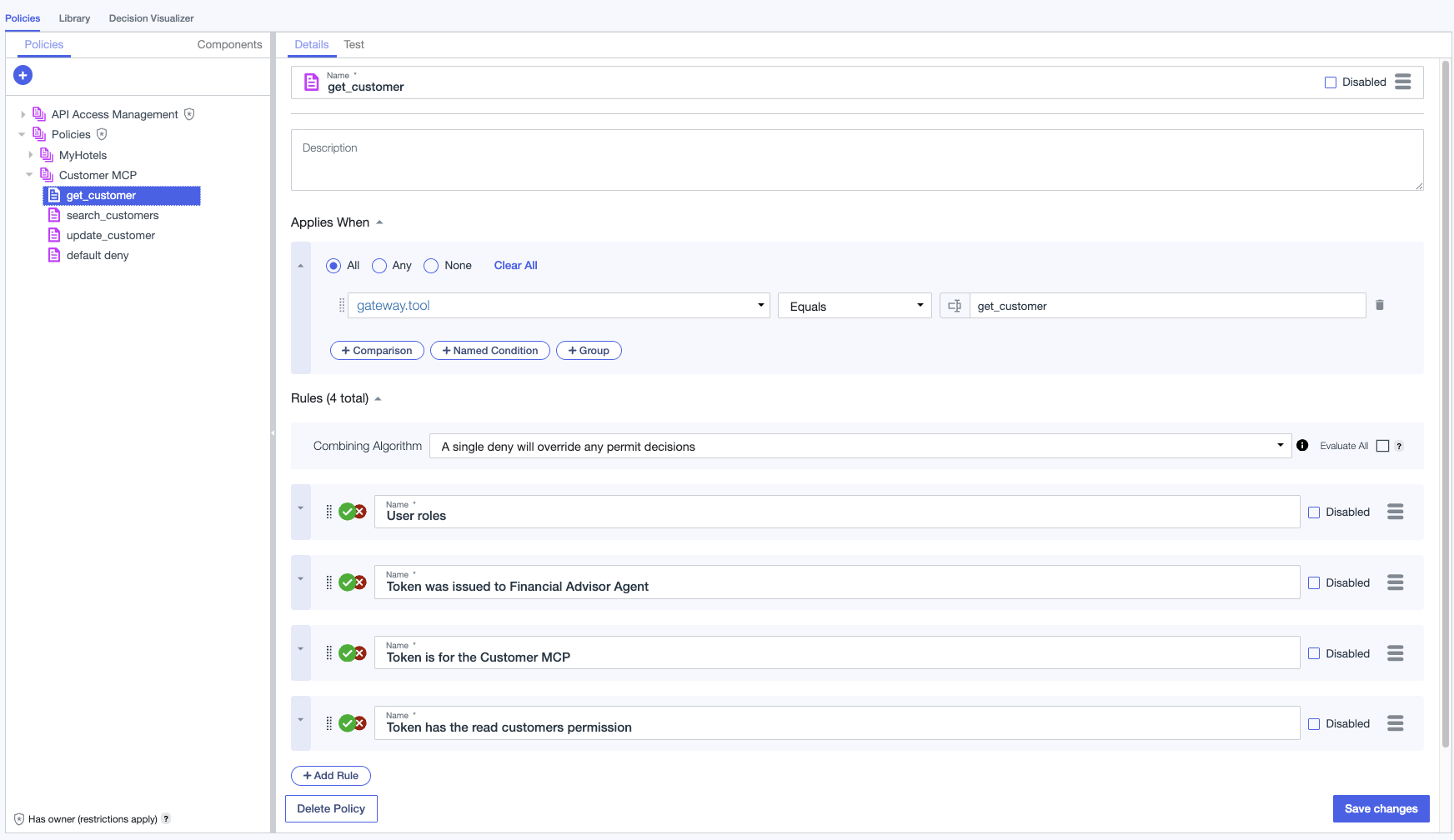
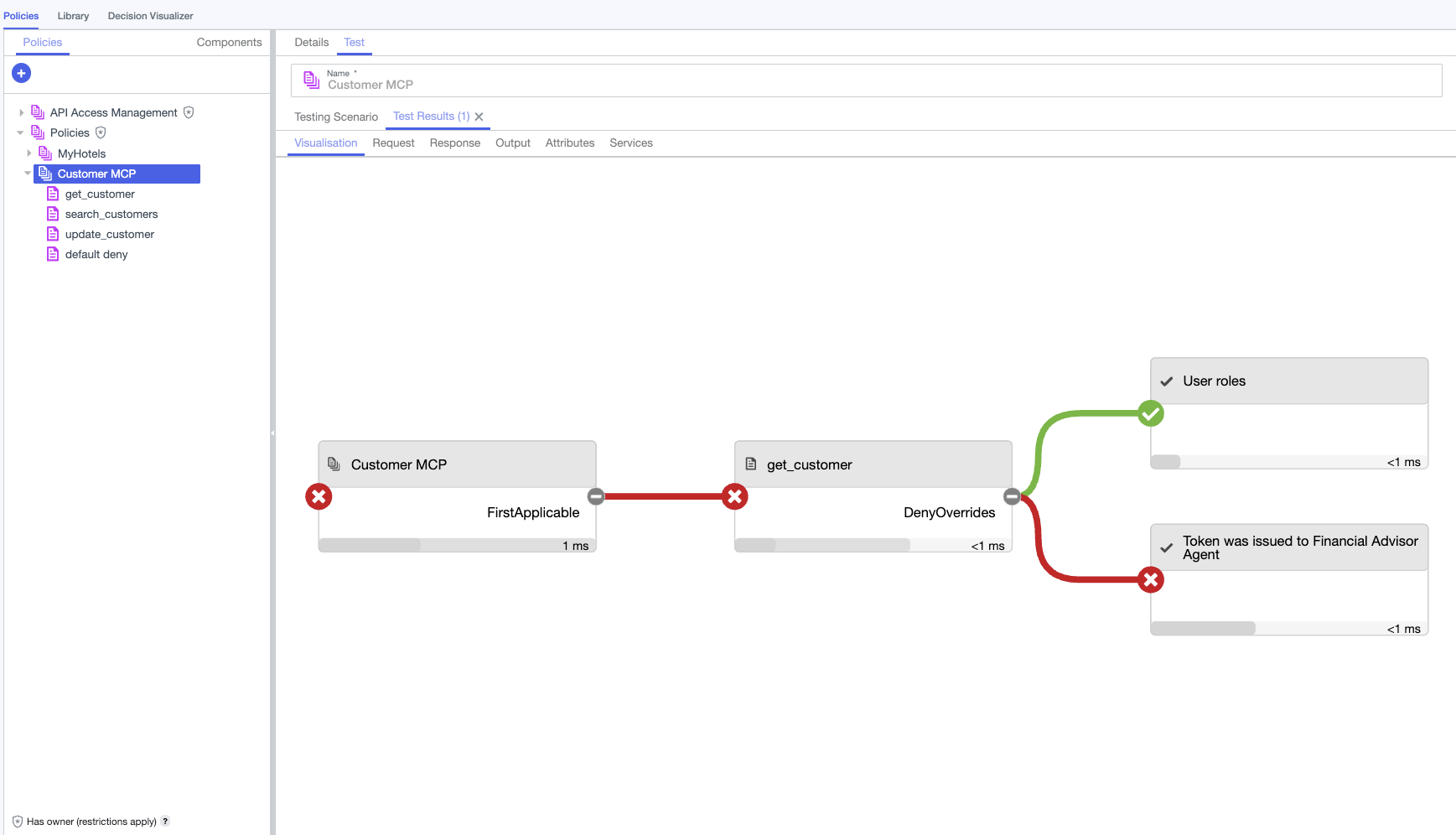
The following two pictures show how the Decision Visualizer depicts the evaluation: a PERMIT (a read tool permitted by the mortgage:read scope), and a DENY (a risky change denied for missing approval). 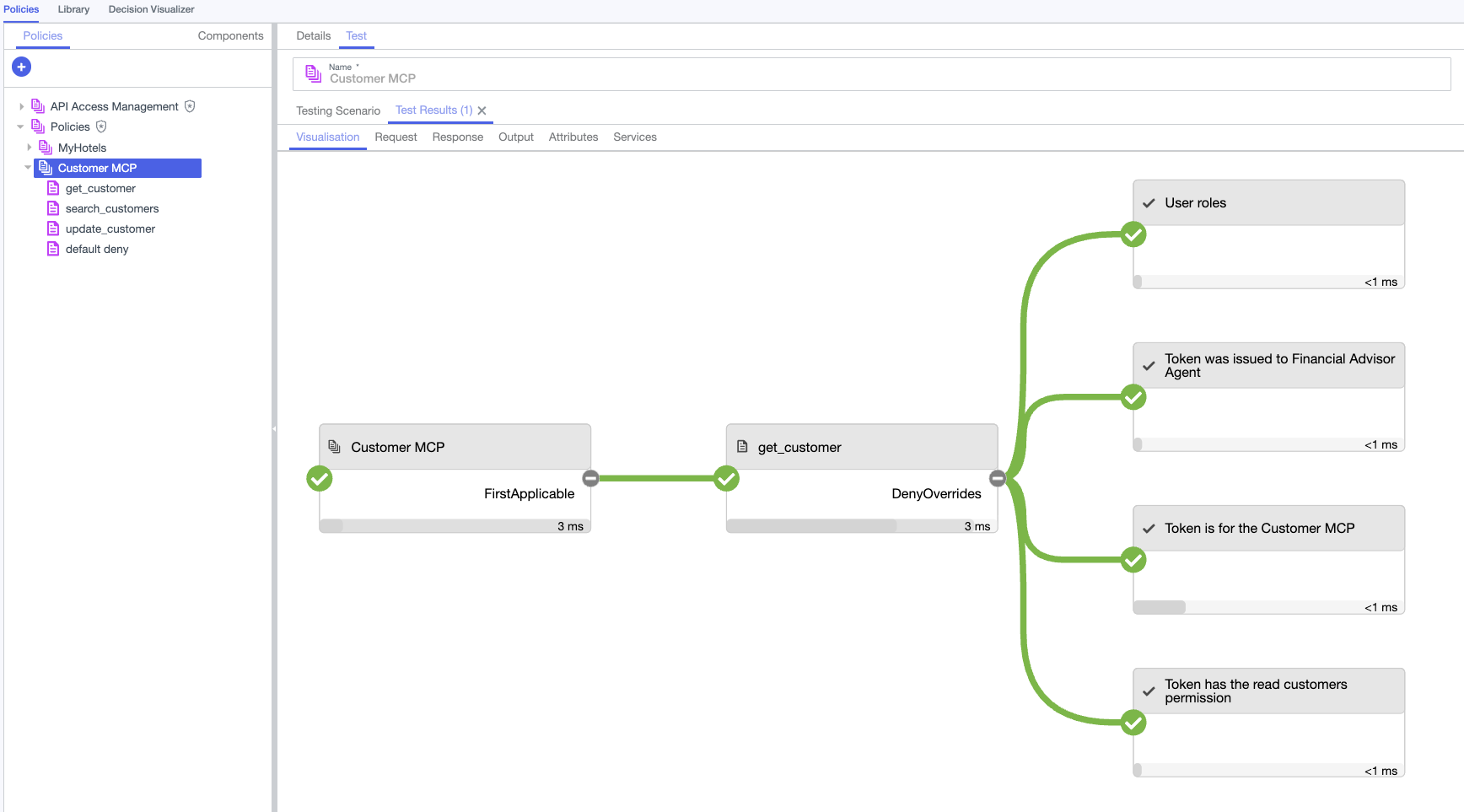
Key Takeaways
This article explained how PingAuthorize provides centralized dynamic authorization for Azure API Management. APIM acts as a Policy Enforcement Point for MCP servers without embedding business authorization rules in the gateway or in the protected MCP servers themselves. The policy fragment is the only integration artifact needed, and because it speaks the Sideband API — shared between PingAuthorize software and PingOne Authorize in the cloud — the same artifact enforces the same policies against either deployment.
This pattern is most useful when:
- Multiple teams or platforms maintain separate authorization policies that express the same business rules, making drift and inconsistency inevitable.
- Policy changes require coordinated redeployments across gateways, functions, or application code.
- Compliance or audit requirements need a centralized, queryable record of every authorization decision regardless of where it was enforced.
- Authorization rules depend on contextual or dynamic attributes — user roles, risk scores, time constraints — that must evolve independently of the applications that enforce them.
The next articles will apply the same pattern to additional enforcement surfaces such as AWS AgentCore Gateway, further showing how authorization decisions can be centralized and standardized across platforms.
Resources
- PingAuthorize Sideband API — how the Sideband API proxies authorization decisions.
- Sideband API configuration — configuring Sideband API endpoints and services on PingAuthorize.
- Azure API Management policies — reference for APIM inbound policy expressions and
send-request. - Source code — APIM policy fragment and configuration guidelines, including the mortgage policy set and its end-to-end test suite (
azure-apim/test/policy-e2e-tests.sh).